Soprano Connect for
Microsoft Entra
Keep using SMS and Voice for multi-factor authentication in Microsoft Entra ID beyond 1 February 2027 with Soprano Connect for Microsoft Entra.

- SMS
- Voice
- RCS
- Viber
Soprano Connect Multi-Factor Authentication for Microsoft Entra ID
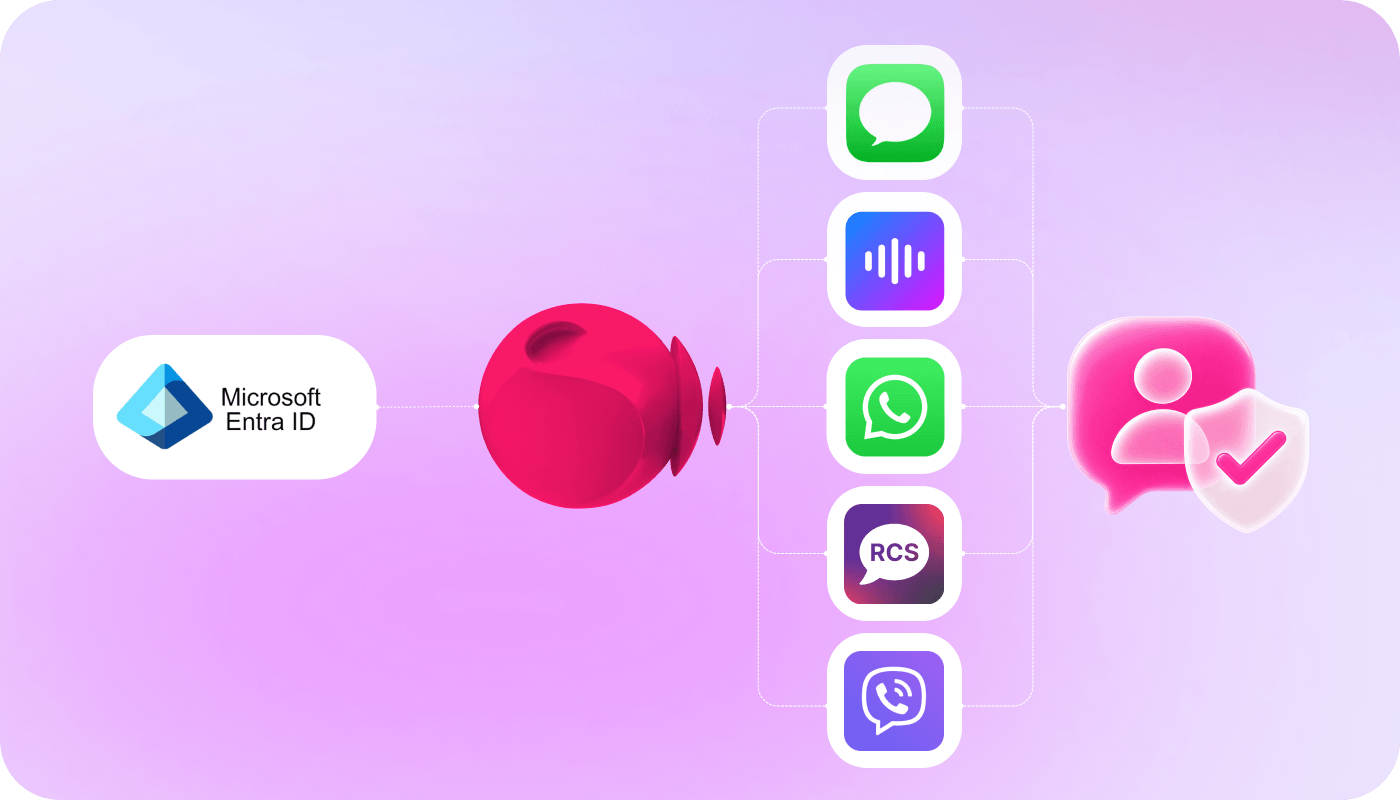
Soprano Connect for Microsoft Entra ID enables organisations to deliver multi-factor authentication (MFA) messages via SMS, Voice, WhatsApp, RCS or Viber through Soprano’s enterprise communications infrastructure.
From 1 February 2027, Microsoft is retiring its own SMS and voice delivery for authentication in Microsoft Entra ID. Soprano Connect lets you continue using SMS and voice for multi-factor authentication (MFA) by acting as customer-managed telecom provider, working within your existing Entra ID authentication policies.
With more than 30 years in secure enterprise communications, Soprano is trusted by governments, banks and Fortune 500 companies to deliver billions of critical messages a year, backed by ISO 27001 and SOC 2 Type II assurance.
Questions about the 2027 change?
Ask Soprano Intelligence about Entra MFA
Get instant answers on the 1 February 2027 retirement, setup through the Microsoft Security Store, supported channels and pricing.
Key Benefits of Soprano Connect for Microsoft Entra:
- Maintain MFA Continuity: Keep SMS and voice MFA available for users who continue to rely on phone-based authentication.
- Delivery You Can Rely On: Global carrier connectivity and telco-grade reliability get authentication messages through, at scale, when it matters most.
- Reach Users on the Right Channel: Deliver MFA across SMS, voice, RCS, WhatsApp and Viber, with built-in SMS fallback if delivery is unsuccessful.
- Your Entra ID Policies Stay in Control: Microsoft Entra ID continues to enforce your authentication method policies while Soprano handles secure delivery.
- Built for Regulated Industries: ISO 27001 and SOC 2 Type II certified, and trusted across finance, government and healthcare where compliance is non-negotiable.
- One View of Every Message: Centralised reporting shows what was sent, delivered or unsuccessful, so nothing slips through unseen.
- Room to Grow Beyond MFA: The same connection can extend into broader authentication journeys and customer messaging over time.
Use Cases
How Enterprise and Government Organisations Can Use Soprano Connect for Microsoft Entra

Workforce Multi-Factor Authentication
Continue using SMS or voice MFA for employees who access Microsoft 365, business applications and other services protected by Microsoft Entra ID.

Contractor and External User Access
Support contractors, partners and other external users who may not be enrolled in passkeys or able to use the same authentication methods as your internal workforce.

Frontline and Field Worker Authentication
Provide accessible MFA options for frontline, mobile and distributed workers who may rely on SMS or voice rather than corporate devices or authenticator apps.
Why Soprano for Microsoft Entra Multi-Factor Authentication Delivery

Proven Authentication Provider
Over 30 years’ experience delivering secure, reliable messaging for enterprise and government organisations.

Enterprise-Grade Infrastructure
Built for high-volume, business-critical messaging across complex and distributed organisations.
Omnichannel MFA Delivery
Deliver multi-factor authentication across SMS, Voice, RCS, WhatsApp and Viber with built-in SMS fallback.

Trusted Microsoft Partner
Years of experience supporting Microsoft authentication messaging across SMS and voice at scale.
How It Works
How Soprano Connect for Microsoft Entra Works
Choose Soprano
Select Soprano through the Microsoft Security Store.
Connect Microsoft Entra ID
Deploy the Azure routing function to connect with Soprano.
Configure & Test
Select users or groups and validate authentication delivery.
Go Live
Move authentication traffic to Soprano ahead of February 2027.
FAQs
Is Microsoft Ending SMS and Voice MFA in Microsoft Entra ID?
No. Microsoft is retiring Microsoft-provided SMS and voice authentication delivery in Microsoft Entra ID from 1 February 2027. Organisations can continue using SMS and voice for MFA by configuring a supported customer-managed telephony provider through the Microsoft Security Store, helping maintain continuity for users who still rely on these methods.
Can I Continue Using SMS or Voice MFA with Microsoft Entra ID After 1 February 2027?
Yes. Organisations can continue using SMS and voice MFA with Microsoft Entra ID after 1 February 2027 by configuring a supported customer-managed telephony provider. Soprano Connect for Microsoft Entra enables organisations to continue SMS and voice authentication delivery through Soprano’s enterprise communications infrastructure.
How Do I Set Up Soprano Connect for Microsoft Entra?
Soprano Connect for Microsoft Entra is designed to make the move to customer-managed telephony straightforward. Organisations select Soprano as their provider, connect the service to Microsoft Entra ID, configure the required users or groups and test the integration before moving authentication traffic into production.
Can Soprano Support SMS and Voice MFA for Microsoft Entra ID?
Yes. Soprano Connect for Microsoft Entra supports MFA delivery across SMS and voice, as well as RCS, WhatsApp and Viber, with built-in SMS fallback. This gives organisations greater flexibility to support different authentication journeys through a single solution, backed by Soprano’s enterprise messaging infrastructure.
What Happens If I Don’t Change My Microsoft Entra ID SMS or Voice Authentication Before 1 February 2027?
If your organisation still relies on Microsoft-provided SMS or voice authentication on 1 February 2027 and has not configured a customer-managed telephony provider, those users may be unable to complete MFA as they do today. Configuring a supported provider such as Soprano can help maintain authentication continuity before the deadline.
Keep Using SMS and Voice MFA with Microsoft Entra
Maintain authentication continuity with Soprano Connect for Microsoft Entra.
Talk to Soprano